
Self-hosted documentation
Your documentation lives in Git, not in a database.
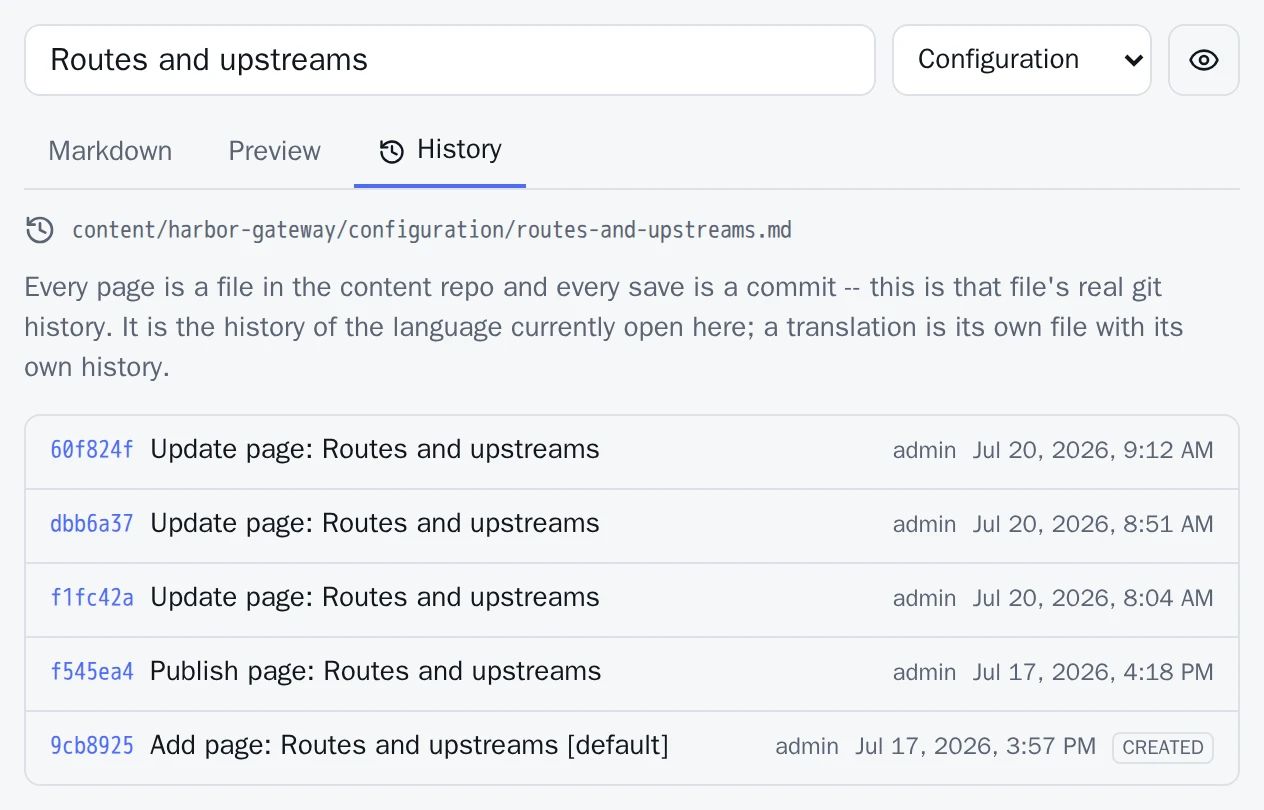
DocuWaves is a documentation site you run yourself. Every project, category and page is a Markdown file in a Git repository you own — and every save in the browser editor is a commit. History, diffs, attribution and restore are not features built on top of that; they are the repository being there.
git clone https://github.com/Syntaxlab-dev/DocuWaves.git
cd DocuWaves
docker compose up -d --build
Then open http://<your-server>:8091 and pick an admin username. There is no
further configuration: with no Git remote set, DocuWaves creates its own repository inside the
data volume and commits to it.

Content in Git
Every save is a commit you can read
DocuWaves does not keep a revisions table. A page's history is its file's
Git history, so the answer the app gives and the answer git log gives are the
same answer.
- History, diffs and restore, for free Each page has a History tab: commits with author, date and message, a coloured diff of what each one changed, and a restore that writes the old text back as a new commit on top — nothing is rewritten or deleted.
- The database is a rebuildable index SQLite by default, PostgreSQL if you prefer. Either way it holds no content of its own — only a search and browse index over the files. Delete it and DocuWaves rebuilds it from the repository on the next start.
-
The files outlive the app
Markdown with a short YAML header, in a layout you can read. Someone can fork the
content repository, edit a
.mdfile and open a pull request; DocuWaves picks the merged change up on its own.
AI assistants
Hand an assistant write access, and keep the receipts
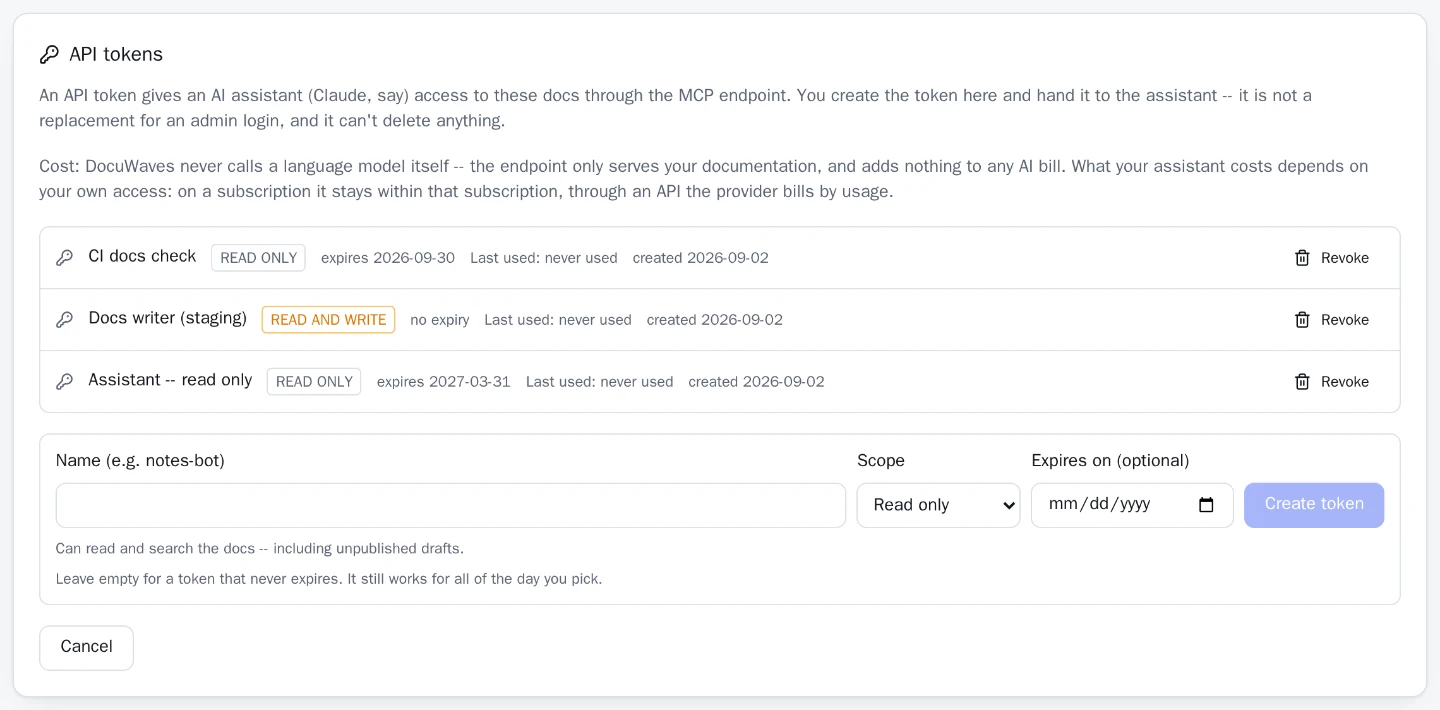
DocuWaves speaks MCP. Point an assistant at /api/mcp with a
bearer token and it can browse, search, read and — with a token that says so — write your
documentation. Every write arrives as an ordinary commit, authored by the token that
made it.
So the ordinary tools answer questions about it:
git log --author='API token'   # every assistant write
git log --author='notes-bot'    # just this one token
git revert <sha>                # undo one of them
-
There is deliberately no delete tool
An assistant can create pages and rewrite them, and both are recoverable — a wrong
edit is visible and one
git revertaway. Deletion is the operation whose damage is invisible afterwards, so it stays in the admin UI where a human confirms it. - Read and write are separate scopes Read is the default in the form. A read token calling a write tool is refused with the scope it has and the scope it needs. Tokens can carry an expiry, and revoking one takes effect on the next request.
-
The token opens one door
An API token authorises
/api/mcpand nothing else — it cannot reach the rest of the admin API, cannot touch branding and cannot create another token. An admin browser session is not accepted on the endpoint either. - It adds nothing to an AI bill The endpoint is a tool server. It answers an assistant's requests about your documentation and never calls a language model itself.
Getting started
No account, and no Git host either
There is no step where you create a repository first, mint a token, or sign up for anything.
On its first start DocuWaves runs git init inside its own data volume, and every
page you write from then on is a real commit in it.
- Local is a complete setup, not a trial Full page history, diffs, restore, attribution, and content that is plain Markdown you can read outside the app. The only thing you do not get is a copy somewhere else.
-
A remote can be added at any point
Put an empty repository's URL in
.envand restart. The history you already have is pushed to it in full — every commit, not squashed into one import — and from then on the instance behaves like one configured with a remote on day one. Removing the URL again puts it back to local with everything intact. -
So back the volume up
On a local-only instance
./datais the only copy of your documentation and nothing mirrors it. Back that directory up, clone it somewhere, or add a remote — the way you would with any other data you would miss.
Licence
MIT, and there is no paid tier
Everything described on this page is in the one open-source repository. No feature sits behind a subscription, no capability is reserved for an "enterprise" edition, and there is nothing to buy. Clone it, run it, fork it, change it.
- MIT licence
- One container
- No telemetry
- No CDN at runtime
- No AI provider account
The everyday things
The rest of it, briefly
- GitHub-flavored MarkdownTables, task lists and fenced code with syntax highlighting, written in a plain editor with a live preview a tab away.
- Diagrams as textA fenced
mermaidblock is drawn as a real diagram — in the preview, on the published page, and in GitHub's own file view. - Images by paste or dragPaste a screenshot into the editor or drop files onto
it: uploaded to the project's
assets/, committed, and referenced at the cursor. - Unsaved work survivesEditor text is kept in the browser and offered back when you return — never applied silently, and never uploaded.
- Full-text searchAcross every published page in every project, in the language and version the reader is currently in.
- Several projects, one instanceOne deployment serves the docs for every tool you maintain, each with its own categories and pages, shown as tiles.
- Multiple languages, optionallyA page can exist in several languages under one slug, with the language in the URL and an honest notice on a page not yet translated.
- Frozen versions, optionallyFreeze the docs at a release and they stay frozen, read-only and readable, while you keep editing the current ones.
- DraftsA page stays invisible to readers until you publish it, and a project with nothing published stays off the public site entirely.
- Branding per instanceName, logo, favicon, accent colour and footer come from a
_site.ymlin the content repository — versioned and reviewable like a page. - Password login or OIDC SSOOne admin account, signing in with a password or through any standard OIDC provider — Authentik, Keycloak, Authelia, Zitadel.
- Real HTML for crawlersEvery public URL is answered with its own title,
description, Open Graph tags, canonical and structured data, plus
/sitemap.xmland/robots.txt.
Try it in about a minute
Docker with the Compose plugin is the only requirement. Nothing else to create, register or configure first.
git clone https://github.com/Syntaxlab-dev/DocuWaves.git
cd DocuWaves
docker compose up -d --build
# then open http://<your-server>:8091